Sezzle Spend isn’t exactly free money, but it sure feels like it when you’re using it to buy something or reduce your payment balance. So when I received it and learned I could get even more, I put in the work to figure it out.
And with Sezzle reporting 3 million active consumers as of the end of 2025, I figured I probably wasn’t the only one trying to understand how to get more rewards.
That curiosity makes sense. U.S. businesses spend an estimated $176 billion each year on incentives and rewards, according to a study from the Incentive Federation.
Pretty quickly, I realized that Sezzle Spend doesn’t come from just one place. Depending on how you shop and which Sezzle features you use, there are several ways it can show up in your account. Here’s what to know about earning it, tracking it, and actually using it before it expires
Key Takeaways
- Sezzle Spend Is A Reward Balance: Sezzle Spend is a rewards balance in your account, not cash, a loan, or a withdrawable balance.
- There Are Multiple Ways To Earn It: Common earning paths include Pay in Full, promotions, Earn tab offers, browser-extension rewards, and some Premium or Anywhere offers.
- Not All Rewards Work The Same Way: Some Sezzle Spend is merchant-specific, while other rewards are labeled Spend Anywhere.
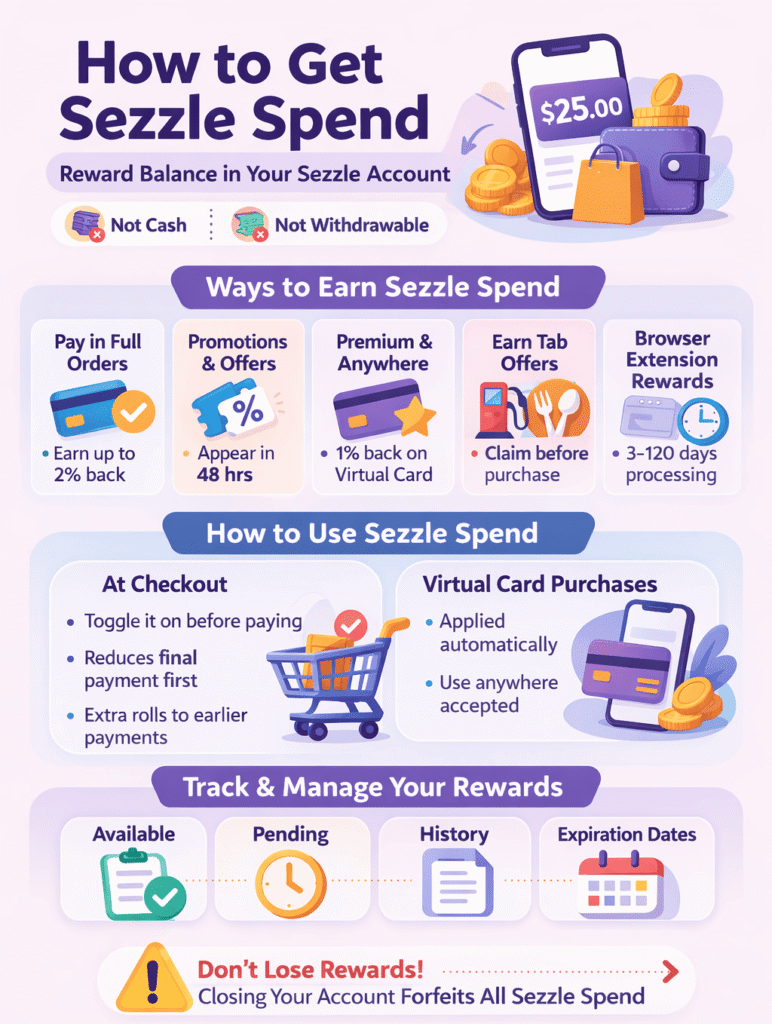
- It Usually Applies To The Last Payment First: Sezzle Spend generally reduces the final installment on a payment plan before rolling backward to earlier payments.
- Expiration and Tracking Matter: Some rewards can sit in Pending before becoming available, and Pay-in-Full-earned Sezzle Spend expires in 60 days.
What Sezzle Spend Actually Is
Sezzle Spend is a rewards balance that Sezzle gives shoppers for certain actions. Once it’s available in your account, you can use it to lower the amount you owe on an eligible Sezzle purchase.
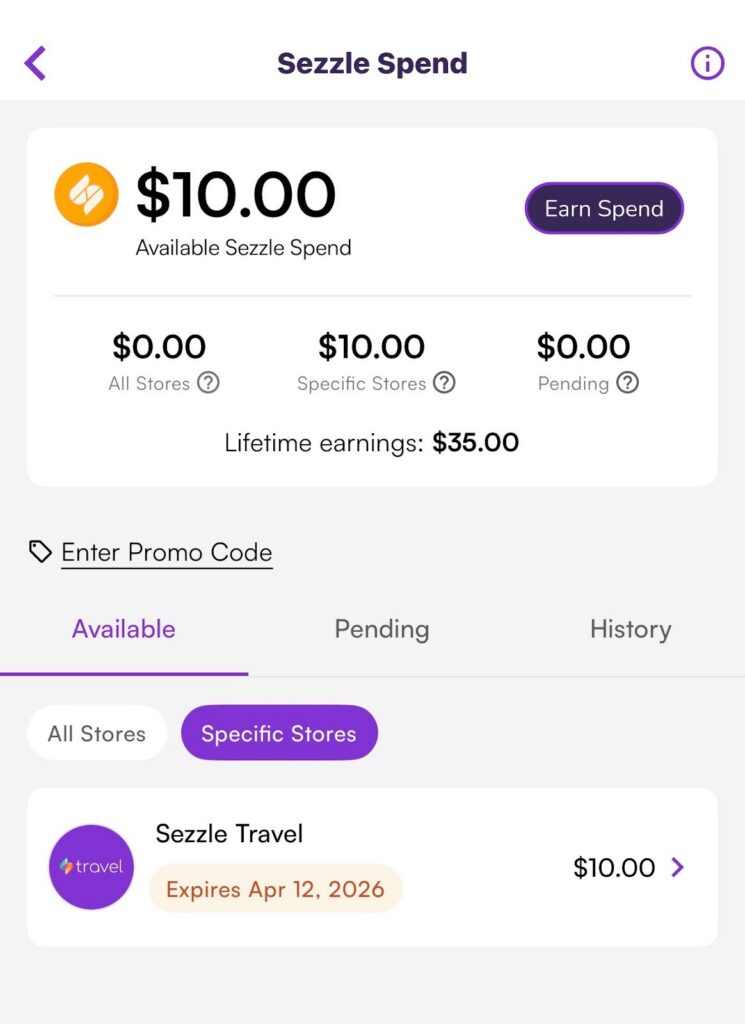
Not every Sezzle Spend reward works the same way. Some rewards are tied to a specific retailer, while others are more flexible. If your balance is merchant-specific, the app will show that. For example, one I recently received from Sezzle is for travel only. If it’s labeled Spend Anywhere, you can use it with any merchant that accepts Sezzle as a payment method.
That difference matters, so it’s smart to check what kind of Sezzle Spend you have before planning a purchase around it.
Where to Find Your Sezzle Spend
You can check your Sezzle Spend balance in the Sezzle app.
According to Sezzle, you may find it by:
- Going to the Earn tab and opening the Sezzle Spend section
- Tapping your initial and finding Sezzle Spend under Benefits
Sezzle also has a tracking view where you may see:
- Available
- History
- Pending, if a reward has been tracked but not fully confirmed yet
If you’re waiting on rewards, that Pending section is worth checking before assuming something didn’t work.
The Main Ways to Get Sezzle Spend
1. Use Pay in Full on Eligible Orders
One of the most direct ways to earn Sezzle Spend is through Pay in Full, which Sezzle also calls Pay in 1. Sezzle says it often awards Sezzle Spend for using this feature. It also states that eligible Pay in Full purchases can earn up to 2% back in Sezzle Spend, though the amount can vary by merchant.
In some cases, Sezzle offers higher percentages on certain brands through special merchant or membership offers. So if your goal is to earn Sezzle Spend consistently, Pay in Full is one of the first features to pay attention to.
2. Look for Promotions
Sezzle also awards Sezzle Spend through promotions. These promotions can work in different ways. Some are tied to shopping with specific stores, while others award Sezzle Spend after a qualifying order is completed. If a reward is tied to a promotion, Sezzle says it may take up to 48 hours to appear in your account. That means promotions can be a useful way to earn Sezzle Spend, but they may not always show up instantly.
3. Check Premium, Anywhere, and Brand-Specific Offers
Sezzle also has higher-return opportunities tied to certain memberships and merchants.
For example, Sezzle says:
- Some Premium/Anywhere purchases made through the Sezzle app can earn higher percentages back on eligible Pay-in-Full orders
- Anywhere members can earn 1% back in Sezzle Spend on Pay-in-Full purchases made with the Sezzle Virtual Card, with some exclusions
- That 1% Anywhere reward cannot be combined with other Pay-in-Full Sezzle Spend benefits
This is one of the easier places to get tripped up, because not every reward stacks.
4. Use Earn Tab Offers Like Gas & Dining
Sezzle’s Gas & Dining offers can also generate Sezzle Spend, but they work differently from an instant discount. Instead of saving money on the spot, you earn Sezzle Spend after the eligible purchase is made and confirmed.
These offers come with stricter rules than many people expect. For example:
- You need to claim the offer before making the purchase
- The offer is tied to a specific location
- Gas, restaurant, and convenience offers must be used within 4 hours
- Grocery offers must be used within 24 hours
Sezzle also has payment method requirements. To qualify, you must use either:
- The Sezzle Virtual Card
- A physical debit or credit card linked to Sezzle
Purchases made through digital wallets like Apple Pay or Google Pay do not qualify, even if those wallets are connected to the right card.
If you miss one of those details, the reward may not track properly.
5. Use Browser Extension Offers Carefully
Sezzle also has browser extension rewards that can lead to Sezzle Spend.
With these offers, timing is slower. Sezzle says pending rewards usually appear within about 3 days of a qualifying purchase, then may take 60 to 120 days to move into your available balance, depending on merchant confirmation.
So if you use an extension offer and don’t see the reward right away, that can still be normal.
How to Use Sezzle Spend
There are two main ways Sezzle Spend can be applied during a purchase.
Standard Sezzle Checkout
If a merchant offers Sezzle directly, you select Sezzle at checkout and are redirected to Sezzle’s payment screen. If you have eligible Sezzle Spend available, you can toggle it on there.
Sezzle Virtual Card Flow
If you’re shopping through Sezzle’s Virtual Card flow, Sezzle says you can also toggle Sezzle Spend during the in-app purchase request.
Either way, it acts as a reward balance that lowers what you owe.
How It Affects Your Payments
This part is easy to misunderstand.
When Sezzle Spend is applied, it usually reduces your order starting with the final installment, not the first one. If the reward amount is larger than the last payment, the remainder rolls backward to earlier installments.
For orders paid in full with the Sezzle Virtual Card, Sezzle says the Sezzle Spend is applied automatically.
So if someone expects their upfront payment to drop first, that may not be what happens.
Watch for Expiration Dates
Sezzle Spend does expire, but not always on the same timeline.
Sezzle says expiration depends on how the reward was issued, and you can check the date in the app. One specific rule Sezzle gives is that Sezzle Spend earned on Pay-in-Full purchases expires in 60 days.
That makes it important to use rewards fairly quickly, especially if you earned them through a Pay-in-Full offer.
Why Rewards May Be Pending or Cancelled
A Pending status does not automatically mean something is wrong. Sezzle says pending rewards generally mean the purchase was reported, but the reward has not been fully confirmed yet.
In some cases, rewards may also be cancelled. Sezzle lists several possible reasons, especially for tracked offers, including:
- Unsupported browsers
- Ad blockers are interfering with tracking
- Not activating the offer correctly
- Excluded categories
- Purchases made outside the allowed time window
- The merchant is not reporting the purchase
That’s why it helps to follow the offer instructions exactly.
One Last Warning: Don’t Lose It by Closing Your Account
If you close your Sezzle account, Sezzle says any Sezzle Spend—including pending rewards—is forfeited.
So if you have an existing balance or are waiting on rewards to become available, closing the account too early could cost you that value.
Final Thoughts
If you want to get Sezzle Spend, the best approach is to use the specific Sezzle features that award it: Pay in Full, promotions, Earn tab offers, browser-extension rewards, and eligible membership-based offers.
The most important thing is paying attention to the rules. Check whether your reward is store-specific or Spend Anywhere, review timing windows, watch for pending status, and keep an eye on expiration dates. Sezzle Spend can be useful, but only if you know how it’s earned and how it’s applied.
FAQs
Sezzle Spend is a rewards balance inside your Sezzle account that can be used to reduce what you owe on eligible Sezzle purchases.
You can earn Sezzle Spend through eligible actions like Pay in Full purchases, promotions, Earn tab offers, browser-extension rewards, and some Premium or Anywhere offers.
Not always. Some Sezzle Spend is tied to specific merchants, while other rewards are labeled Spend Anywhere and can be used wherever Sezzle is accepted.
Pending usually means the reward was tracked but has not yet been fully confirmed. This often happens while Sezzle waits for merchant reporting or approval.
Yes. Expiration depends on how the reward was issued, and Sezzle says Pay-in-Full-earned Sezzle Spend expires in 60 days.