Here’s how the process works, from approval to repayment.
Key Takeaways
- Two Card Options: Sezzle offers single-use cards for individual purchases and multi-use cards for eligible subscription members.
- Approval Comes First: You’ll usually need to submit the store and purchase amount before receiving or activating the card.
- Full Total Matters: Include taxes, shipping, tips, and other charges when requesting your approved amount.
- Online And In-Store Use: Enter the card details online or add an eligible card to Apple Pay or Google Pay for contactless checkout.
- Payments Stay In The App: Your installments, due dates, remaining balance, and eligible rescheduling options are managed through Sezzle.
What Is the Sezzle Virtual Card?
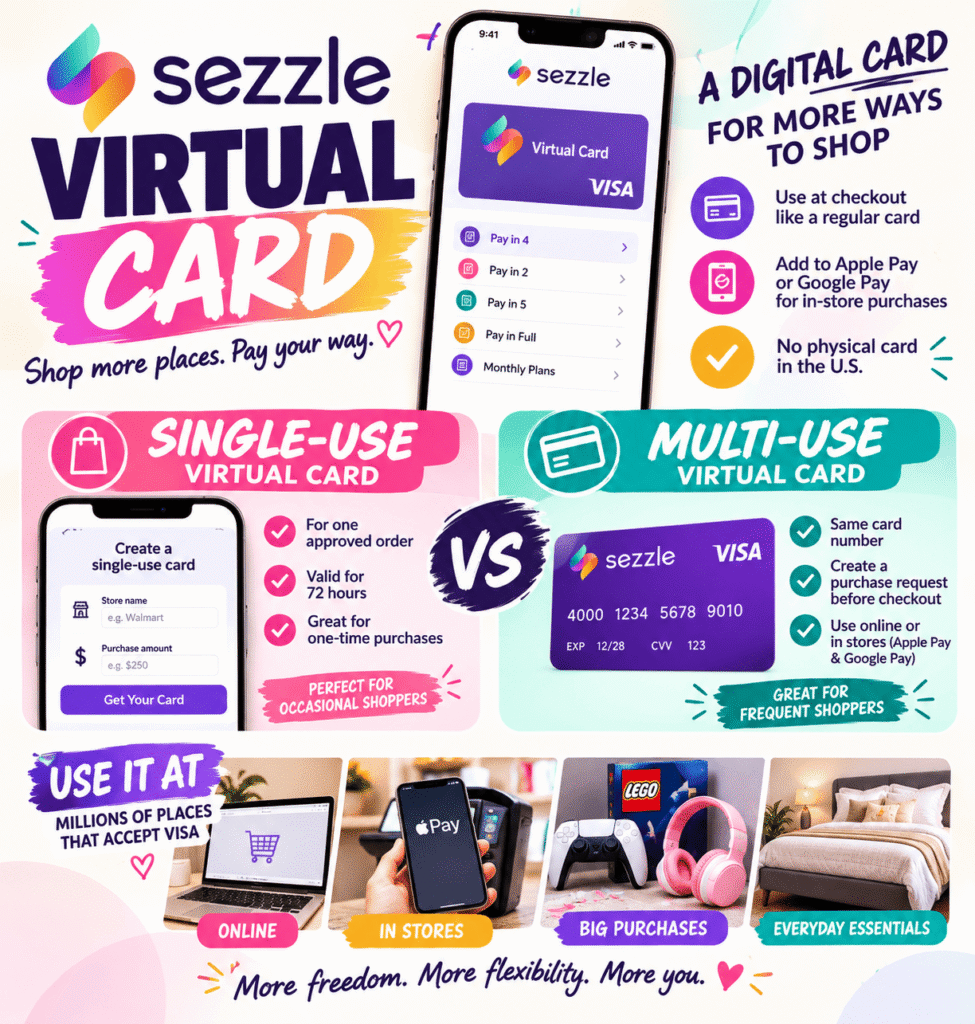
The Sezzle Virtual Card is a digital Visa payment credential that lets eligible shoppers use Sezzle at checkout without a physical card.
Instead of selecting a Sezzle button, you enter the virtual card number, expiration date, and security code as you would with a regular payment card. For an in-store purchase, an eligible card can be added to Apple Pay or Google Pay.
Sezzle pays the merchant for the approved transaction. You then repay Sezzle under the plan presented in the app. Pay in 4 is the most familiar option, but some users may see Pay in 2, Pay in 5, Pay in Full, or longer monthly financing.
There’s currently no physical Sezzle card in the U.S.
Single-Use vs. Multi-Use Virtual Cards
Sezzle offers two main card formats, and they don’t work exactly the same way.
Single-Use Virtual Card
A single-use card is generated for one approved order. You tell Sezzle where you’re shopping and how much you expect to spend. Once approved, Sezzle creates temporary card details for that transaction.
The card must generally be used within 72 hours. If it expires or the purchase amount changes, you may need to submit another request. The feature is currently offered through the Sezzle mobile app to eligible U.S. shoppers, and availability can vary by account.
This option can be useful when you only occasionally need to shop at a store that doesn’t display Sezzle directly at checkout.
Multi-Use Virtual Card
A multi-use card keeps the same card number instead of generating new details for every order. However, that doesn’t mean you can use it whenever you want without taking another step.
Before checking out, you generally need to create a purchase request for enough money to cover the complete transaction. The card may be declined when there’s no active request or when the final total exceeds the approved amount.
Sezzle Anywhere expands the multi-use card to eligible U.S. merchants that accept Visa, subject to Sezzle’s restrictions. It’s a paid subscription and can be used online or through Apple Pay and Google Pay in stores.
Sezzle Premium is another subscription product, but it focuses on access to participating brands, waived fees at certain merchants, discounts, rescheduling benefits, and other perks.
How to Use the Sezzle Virtual Card Online
Using the card online is similar to paying with a credit or debit card:
- Open the Sezzle app.
- Choose the store or virtual card option.
- Enter your expected purchase amount.
- Review the available plan, down payment, due dates, and fees.
- Create the single-use card or activate your multi-use card.
- Copy the card number, expiration date, and security code.
- Enter those details in the card section of the retailer’s checkout page.
The amount you request should include the entire order, not just the product subtotal. Remember to account for sales tax, shipping, service charges, and tips.
The confusing part of using a Sezzle Virtual Card isn’t entering the card number. It’s knowing which type of card you have, where it works, and what you need to do before checking out.
Some Sezzle cards are created for one purchase and then expire. Others keep the same card details but must be activated with an approved purchase request. Your available options can also depend on your account, subscription, purchase amount, and the store you choose.
Before you shop, confirm retailer coverage in our who accepts the Sezzle virtual card so checkout doesn’t fail at the last step.
A purchase can be declined or charged differently when the merchant submits an amount higher than the original request. Sezzle specifically warns shoppers to include costs such as tax, shipping, and tips when entering the purchase amount.
How to Use the Card in Stores
Eligible single-use and multi-use cards can be added to Apple Pay or Google Pay for in-person shopping.
You’ll first create or approve the purchase through Sezzle. At the register, select the Sezzle card in your mobile wallet and tap your phone against the contactless payment terminal.
Planning an in-person purchase? how to use Sezzle in stores walks through adding the card to your mobile wallet.
This only works when the retailer accepts the digital wallet you’re using. Walmart, for example, doesn’t accept Apple Pay or Google Pay directly, so shoppers generally need to add the Sezzle card to Walmart Pay instead.
It’s best to create the card before approaching the register. The final total must fit within the approved amount, and the request may take longer if you need to adjust it after tax or other charges are added.
How the Installment Plan Works
Pay in 4 usually requires 25% of the purchase at checkout. The remaining balance is divided into three payments collected every two weeks, spreading repayment across six weeks.
For example, an approved $160 purchase would normally be divided into four $40 installments before any applicable fees. The first $40 is due when the order is placed.
Depending on the transaction, Sezzle may instead offer:
- Pay in 2, with half due upfront and half due two weeks later
- Pay in 5, with five biweekly installments
- Pay in Full, with the entire amount collected at checkout
- Monthly financing lasting between three and 36 months
Longer financing may include interest, while shorter plans can carry service fees. The exact terms should appear before you confirm the purchase.
Does the Sezzle Virtual Card Cost Money?
A service fee may apply, particularly when using a single-use card at a merchant outside Sezzle’s partner network without a subscription.
The amount depends on the transaction and Sezzle product. Any charge should appear with the payment plan before you accept the order. Some partner transactions don’t have a service fee, while eligible Premium or Anywhere purchases may receive different fee treatment.
Online-only merchants may still work — see where you can use Sezzle for limits on virtual-card spending.
A subscription can reduce or eliminate certain transaction fees, but it creates a recurring monthly cost. Someone making one virtual card purchase may spend less with a one-time service fee than with an ongoing membership.
Review the total repayment amount rather than assuming every Pay in 4 transaction is completely free.
Final Verdict
The Sezzle Virtual Card converts an approved Sezzle purchase into digital Visa card details that can be entered at checkout or added to a mobile wallet.
A single-use card works for one approved transaction and generally expires after 72 hours. A multi-use card keeps the same card details, but you still need an active purchase request that covers the full order. Sezzle Anywhere expands where eligible users can use that card.
Before completing a purchase, check the approved amount, payment plan, first installment, service fee, and store restrictions. The virtual card can make Sezzle usable at more retailers, but every order is still approved separately and must fit within the repayment schedule shown in the app.
Before you choose a provider, read our Sezzle review to compare fees, store coverage, and repayment plans.
FAQs
Is the Sezzle Virtual Card a real credit card?
No. It’s a digital Visa payment method connected to an approved Sezzle installment plan rather than a traditional revolving credit account.
How quickly can I use a Sezzle Virtual Card?
You can generally use it after Sezzle approves your purchase request and generates or activates the card. Approval and available features vary by account.
Can I use the Sezzle Virtual Card more than once?
Single-use cards are limited to one approved transaction. Eligible multi-use cards keep the same card details, but you may still need a new purchase request before each order.
Can I add the Sezzle Virtual Card to a mobile wallet?
Eligible cards can be added to Apple Pay or Google Pay. The store must accept your chosen digital wallet for the payment to work.
What happens if my purchase total changes at checkout?
The card may be declined if the final total exceeds the approved amount. Include taxes, shipping, tips, and other charges when creating your purchase request.