And I know that isn’t the answer you want, but don’t worry; I’m here to walk you through it.
Whether you can still use Sezzle depends on how you’re shopping, which virtual card features are available in your account, and what’s in your cart. Let’s break it down.
Key Takeaways
- Virtual Card Required: Walmart doesn’t display Sezzle at checkout, so you’ll need to pay with an eligible Sezzle virtual Visa card.
- Online and In-Store Access: Use the card details on Walmart.com or connect the card to Walmart Pay for store purchases.
- Subscriptions Aren’t Always Necessary: Some shoppers can create a single-use card without enrolling in a monthly Sezzle plan.
- Most Everyday Items Qualify: Groceries, clothing, electronics, household supplies, and other common Walmart products may be eligible.
- Check Your Full Total: Include tax, delivery charges, and other fees when requesting a virtual card to help avoid a declined payment.
Does Walmart Accept Sezzle?
You can use Sezzle for many Walmart purchases, but not through a direct Sezzle checkout option.
Instead, eligible shoppers create a Sezzle virtual Visa card and use it as the payment method. The process is slightly different depending on whether you’re ordering through Walmart.com or shopping in-store.
Your purchase must still be approved by Sezzle. Having spending power displayed in the app doesn’t guarantee that every Walmart transaction will go through.
How to Use Sezzle on Walmart.com
Figuring out how to use Sezzle on the Walmart website is something I had to figure out on my own. Thankfully, you don’t have to.
For an online order, you’ll typically create a single-use or multi-use virtual card in the Sezzle app.
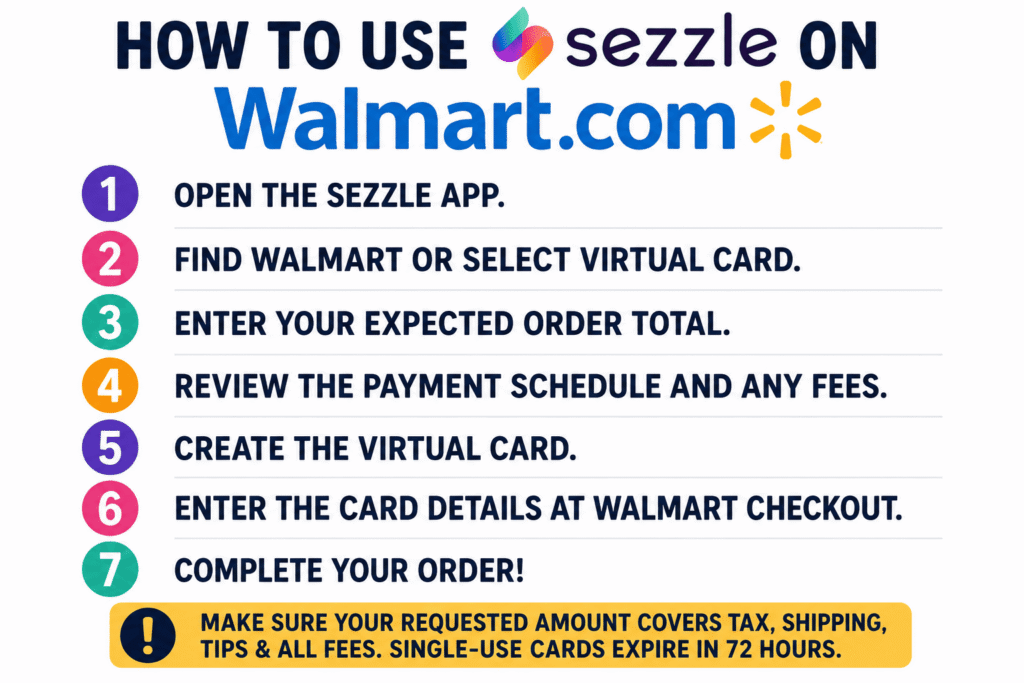
Here’s how it works:
- Open the Sezzle app.
- Find Walmart or select the virtual card option.
- Enter your expected order total.
- Review the payment schedule and any fees.
- Create the virtual card.
- Enter the card details during Walmart checkout.
Make sure the requested amount includes sales tax, delivery charges, tips, and any other fees. Walmart may decline the order if the total exceeds the approved virtual card amount, even by a small amount.
A single-use card is designed for one transaction and may expire if you don’t use it within the allowed period. If your Walmart cart changes after you create the card, you may need to cancel it and request another one for the correct total.
How to Use Sezzle at a Walmart Store
Using Sezzle at a physical Walmart location takes an additional step because Walmart doesn’t accept Apple Pay or Google Pay at its registers.
Not every Walmart aisle item qualifies; Sezzle virtual card acceptance explains where the virtual card typically works.
You’ll generally need to:
- Create or activate your Sezzle virtual card.
- Add the card to your Walmart account.
- Select it as the payment method in Walmart Pay.
- Scan the Walmart Pay QR code at checkout.
Set this up before you reach the register. Creating the card and adding it to Walmart Pay while other shoppers are waiting behind you can turn a simple checkout into a stressful one.
Some Sezzle users may have access to a reusable card through a paid subscription, while others may need to generate a new card for each purchase.
Do You Need a Sezzle Subscription?
Not always.
Some eligible shoppers can create an on-demand single-use card for an individual Walmart purchase without enrolling in a monthly plan. Sezzle may charge a service fee when you use this option.
Paid Sezzle memberships can provide access to a reusable virtual card and may expand where you can shop. However, paying for a subscription may not make sense when you only plan to use Sezzle at Walmart once or twice.
Compare the monthly membership cost with the fees shown for a single-use card before choosing either option.
What Can You Buy at Walmart With Sezzle?
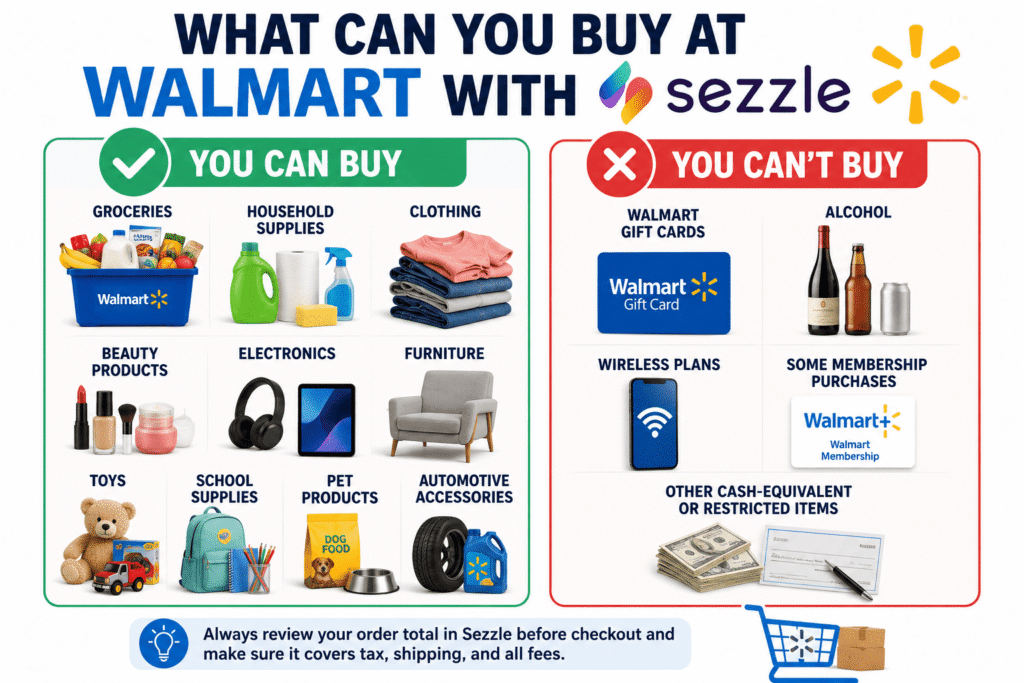
Sezzle can work for many standard Walmart purchases, including:
- Groceries
- Household supplies
- Clothing
- Beauty products
- Electronics
- Furniture
- Toys
- School supplies
- Pet products
- Automotive accessories
That makes Walmart different from retailers that only sell expensive or occasional items. You could potentially use Sezzle for a large electronics purchase, a back-to-school order, or a cart filled with household essentials.
In-store checkout works differently than Walmart.com — follow using Sezzle in stores for wallet setup and tap-to-pay steps.
However, using installments for routine purchases can become difficult to manage. If you finance groceries this week and shop again next week, you may end up making payments on several Walmart orders at once.
What Can’t You Buy?
Certain products and services may be restricted, including:
- Walmart gift cards
- Alcohol
- Wireless plans
- Some membership purchases
- Other cash-equivalent or restricted items
A mixed cart can also cause problems. If your order includes both eligible products and a restricted item, the entire transaction may be declined.
Try removing the questionable item and purchasing it separately with another payment method.
How Much Will You Pay Upfront?
With Sezzle’s standard Pay in 4 plan, your purchase is divided into four installments over six weeks.
The first payment is generally due when you place the Walmart order. The remaining three payments are collected every two weeks.
For example, a $200 approved order would usually be divided into four $50 payments, before any applicable fees. You’ll need enough money available for the first installment when checking out.
Other payment plans may appear depending on your account, purchase amount, and eligibility. Always review the exact schedule before approving the order.
Does Sezzle Charge Fees at Walmart?
It can.
A single-use virtual card may include a service or finance fee. Sezzle should show the cost before you accept the purchase plan.
Walmart sells almost everything, from weekly groceries to furniture and electronics, so naturally, I was curious: can I use Sezzle at Walmart?
Well… it depends.
Walmart supports several BNPL providers — compare them in our Walmart buy now pay later options before defaulting to Sezzle.
You may also need to consider:
- A monthly membership fee
- Failed-payment fees
- Rescheduling fees
- Charges connected to your selected repayment method
Walmart itself generally doesn’t add a special fee just because you’re using a Sezzle virtual card. The main extra cost typically comes from Sezzle and the specific product attached to your account.
An interest-free label doesn’t necessarily mean the transaction is completely free, so review the total rather than focusing only on the installment amount.
Final Answer
Walmart doesn’t provide a Sezzle button at checkout, but eligible shoppers can still use a Sezzle virtual Visa card for many online and in-store purchases.
For online orders, enter the card details on Walmart.com. For store purchases, add the card to Walmart Pay and scan the app at the register.
Check that the approved amount covers the complete order and remove restricted products such as gift cards or alcohol. Sezzle can make a larger Walmart purchase easier to spread out, but it works best when all four payments already fit into your budget.
Before you choose a provider, read our full Sezzle review to compare fees, store coverage, and repayment plans.
FAQs
Does Walmart have Sezzle as a checkout option?
No. Walmart doesn’t offer a direct Sezzle button, but eligible shoppers can use a Sezzle virtual Visa card as their payment method.
Can I use Sezzle for Walmart grocery orders?
Yes, many grocery purchases may qualify. Approval still depends on your Sezzle account, order total, and the products included in your cart.
How do I use Sezzle at a Walmart store?
Create or activate your Sezzle virtual card, add it to Walmart Pay, and scan the Walmart Pay QR code at the register.
Can I use Sezzle for Walmart pickup or delivery?
Yes, you may be able to enter the Sezzle virtual card when placing a pickup or delivery order online. Make sure the approved amount covers taxes, tips, and service charges.
What happens if I return a Walmart purchase made with Sezzle?
Walmart sends the refund back to the virtual card. Sezzle then adjusts your remaining installments or returns any eligible amount you’ve already paid.